

What makes VR applications excel as collaboration tools?
Sean Keogh · 29 May 2024 · 3 min read
User Experience (UX)
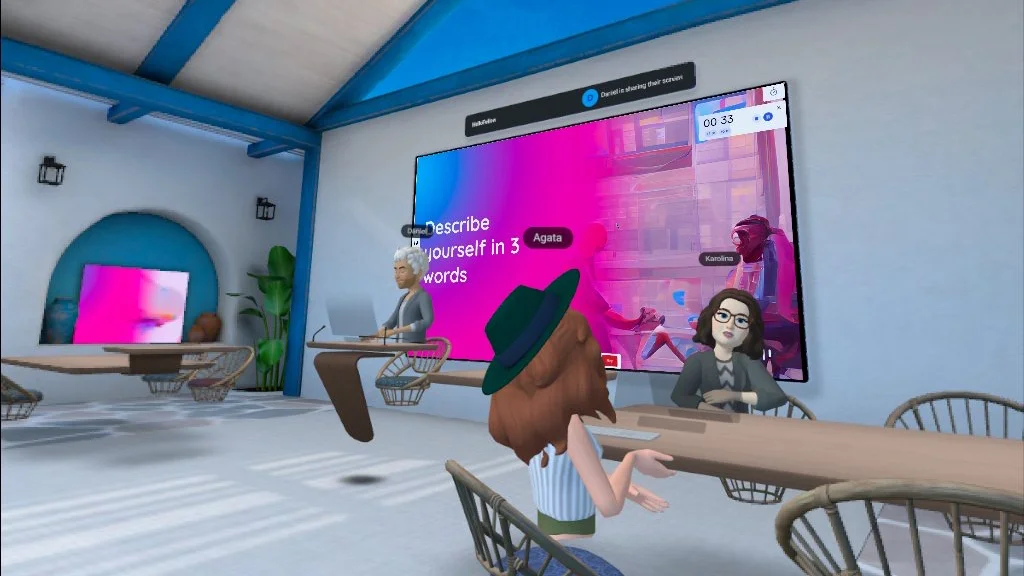
headroom’s remote colleague speed-dating, known as “Hello Fellow”, inside Meta Horizon Workrooms
Virtual reality (VR) applications have emerged as powerful tools for collaboration, offering a unique blend of immersive experiences and practical functionalities. The key benefits of VR for collaboration are rooted in creating a sense of presence, focus, and connectedness among users. Here are the primary factors that make VR applications excel as collaboration tools:
Enhanced Presence and Engagement
One of the most significant advantages of VR applications is the ability to generate a feeling of personal presence in virtual spaces. Unlike traditional video calls or text-based communication, VR places users in a shared, immersive environment where they can interact with each other as if they were physically present. This heightened sense of presence leads to more engaging and effective collaboration, as participants feel more connected and involved.
Focus and Productivity
VR environments help users concentrate on the task at hand by minimizing external distractions. In a virtual workspace, participants are less likely to be interrupted by notifications, emails, or other real-world stimuli. This focused setting allows teams to work more efficiently and creatively, enhancing overall productivity and collaboration quality.
Social Capital and Connectedness
The shared experiences facilitated by VR applications help build social capital among team members. Engaging in collaborative tasks in a virtual environment fosters a sense of camaraderie and mutual understanding, which strengthens team dynamics and enhances trust. This feeling of connectedness is crucial, especially in remote work settings where physical interactions are limited.
Key Features for Effective VR Collaboration
1. Welcoming Environments
Creating friendly and visually appealing virtual spaces is essential for user comfort and engagement. Unlike dull office settings, virtual environments can be designed to be more inspiring and conducive to creativity. This can range from tranquil nature-inspired settings to futuristic virtual offices, helping users feel more relaxed and motivated.
2. Intuitive Interfaces
VR applications should leverage the unique capabilities of virtual reality rather than mimicking traditional interfaces. User-friendly and intuitive controls are crucial, ensuring that participants can navigate and use the VR environment without a steep learning curve. This ease of use is critical for widespread adoption and effective collaboration.
3. Low Entry Barriers
For VR collaboration to be successful, it is vital to minimize friction in accessing the virtual space. This includes ensuring that the technology is easy to set up and that users can join the correct application and virtual room with minimal hassle. Reducing entry barriers encourages more frequent and spontaneous use of VR for collaboration.
4. Integration with 2D Tools
Seamless integration with traditional 2D tools, such as document editors and project management software, enhances the functionality of VR applications. This hybrid approach allows users to leverage the immersive aspects of VR while still accessing familiar tools and resources, ensuring a comprehensive and efficient workflow.
5. Personable Avatars
Using avatars that strike a balance between realism and abstraction can help users feel more comfortable and engaged in the virtual environment. Avatars should be expressive and customizable, allowing users to convey their personality without the uncanny valley effect that overly realistic representations might produce.
Conclusion
While the technical brilliance of a VR application and an extensive feature set might seem appealing, the true success of VR as a collaboration tool lies in its ability to create immersive, engaging, and user-friendly experiences. By focusing on creating environments that promote well-being, simplifying user interfaces, and ensuring easy access, VR applications can significantly enhance collaborative efforts and drive innovation within teams.